Industrial 3D Printer Buyers Guide
Over 77% of printers marketed for high performance polymers can’t reliably print PEEK or ULTEM. Make your next investment with confidence, not consequences.

Polyether ether ketone (PEEK) is a high performance engineering thermoplastic, prized for its high strength to weight ratio and chemical resistance. As such, PEEK has found uses in demanding sectors including the aerospace, automotive, chemical and medical industries.
Previously, PEEK was only available as a bulk material intended for industrial processing such as injection molding, or extrusion. But over the last decade or so, it has been made available as a filament for additive manufacturing, thus unlocking the power of PEEK to a broader manufacturing base.
But such performance comes at premium, both in terms of cost and in terms of processing.
In this article, we will take an overall look at PEEK, and importantly, how users can successfully print it in order to get the most from PEEK’s material properties, while reducing print failures.
Amorphous vs Crystalline Structure
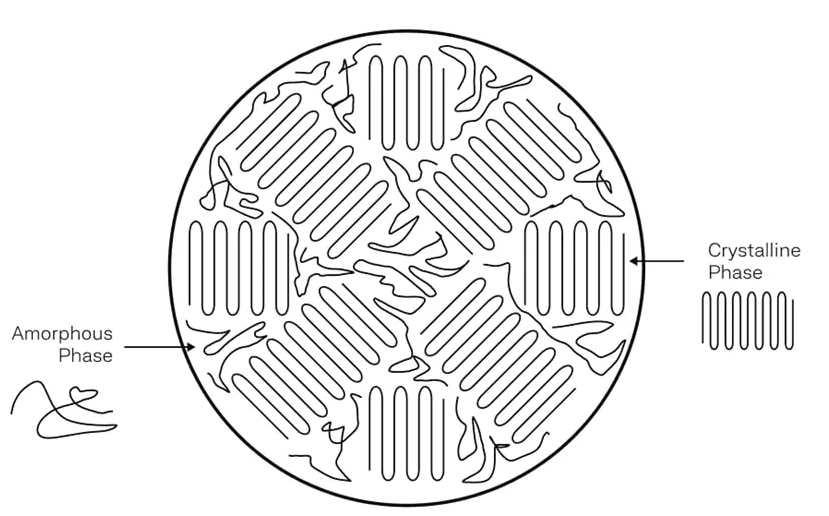
In its default bulk material state, such as in PEEK filament or pellet, the material is classed as a semi-crystalline thermoplastic. This means it contains both amorphous and crystalline regions. The amorphous regions feature randomised polymer chains, and the crystalline regions are more highly ordered, in a crystalline structure.
In its crystalline state, PEEK benefits from high strength, high chemical resistance, high wear resistance and enhanced high temperature properties. It is also much harder to process in its crystalline state. In the amorphous state, PEEK displays high toughness, while having better processability.
PEEK is generally supplied in its semi-crystalline state, because this is the natural equilibrium solid state of the material. In other words, this is how PEEK solidifies naturally when cooled. In the semi-crystalline state, PEEK is dimensionally stable, and it behaves predictably when reheated.
Crystallization in high performance polymers such as PEEK occurs during controlled cooling from the melt phase, and its extent depends on the cooling rate and thermal history. Too much crystallization results in a strong but stiff (brittle) material. Too little, and the risk of creep under load becomes an issue. Achieving this balance requires the right equipment to control the cooling rate and thermal profile during solidification.
Annealing vs. In-situ Crystallization
The controlled crystallization of PEEK during cooling can be achieved in two principle ways: by annealing, or by in-situ crystallization.
With the annealing process, a PEEK part is produced in the 3D printer, then removed from the bed, and placed into an oven to promote crystallization. This method is often used when the build chamber temperature is insufficient to allow for property crystallization.
When the in-situ crystallization method is used, the crystallization occurs inside the 3D printer build chamber, during the printing process. Typically, the build chamber temperature must be in excess of 133°C in order for the crystallization process to occur within PEEK parts.
There are pros and cons to using each method when printing PEEK.
If annealing a PEEK part, benefits include both higher degrees of crystallization, and of crystalline uniformity throughout the part. However, as the material shifts from amorphous to crystalline, there is a corresponding decrease in material volume, resulting in part deformation. The deformations can be relatively severe in PEEK parts, and can alter the geometry of the printed part negating any benefits gained from the precision of the 3D printing process.
For the benefit of maintaining dimensional stability and part feature tolerances, it is therefore preferred to use the in-situ crystallization method. While in-situ crystallization can result in reduced levels of crystallization and uniformity, the dimensional stability of the part is maintained.
This is the trade-off to consider when opting for either in-situ crystallization versus annealing:
Dimensional stability with slightly less crystallization, versus deformed parts with higher crystallization. And in applications where accuracy and material performance are desirable, the trade-off favors the in-situ method when it comes to PEEK.
Printing Temperatures
To achieve in-situ crystallization of PEEK and maximize part properties a build chamber temperature and bed temperature of 133°C or higher is needed. The extrusion temperature for PEEK 3D printing should fall in the range of 365-440°C.
The values mentioned below can vary according to the material manufacturer, so please consult the material datasheet and manufacturer’s recommendations for optimum printing.
Hot End Temperature
The extrusion temperature for 3D printing PEEK filaments should fall within the range of 365-440°C in order for it to melt and flow properly through the nozzle. The high temperature range needed for PEEK is generally more than what is available on consumer-grade 3D printers, although with modification to the hot end, these temperatures can be reached. Failure to print at optimal nozzle temperatures can result in poor flow, and weak layer adhesion.
With that in mind, just because a 3D printer can reach these temperatures at the nozzle, it is still not advised to attempt to print PEEK without the required heated chamber and bed temperatures.
Chamber Temperature
In order to get the best quality of print and to maintain the superior physical properties of PEEK, the heated chamber temperature should be high enough to allow for in-situ crystallization. This generally occurs in chamber temperatures in excess of 133°C.
Printing below this temperature will result in the PEEK being printed into an amorphous state. The end result is a decrease in material performance of the printed part, across multiple aspects, including reduced flexural and tensile strength, decreased chemical and heat resistance, lower interlayer bond strength, and a reduced coefficient of friction.
The chamber must also hold that temperature evenly. An optimal printer for PEEK will sustain high chamber temperatures and ensure thermal uniformity throughout the build volume, which comes down to the airflows inside the chamber.
Bed Temperature
In order to maintain bed adhesion and prevent warping from the bed, PEEK should be printed on a heated bed with a minimum temperature of 133°C (the same as the chamber temperature). Bed temperatures of up to 200°C can be utilized, and can improve bed adhesion at higher temperatures.
PEEK bonds well to PEI-covered build plates, and adhesion can be further enhanced with PEEK specific adhesives.
Printer Requirements for PEEK Printing
The temperatures above describe what PEEK needs from a machine. Whether a given printer can actually deliver them, and hold them for the length of a print, comes down to a short list of specific features. If you are checking whether your own printer is up to the job, or working out what to buy, this is the checklist.
An All-Metal Hot End
PEEK runs at 365–440°C at the nozzle. PTFE-lined hot ends break down and release fumes well below that, so they are ruled out completely. An all-metal hot end is non-negotiable. The temperature sensor and heater have to match it too. A standard 100k thermistor tops out near 300°C, so the machine needs a high-temperature thermistor or a thermocouple, paired with a heater cartridge powerful enough to actually reach and hold 440°C rather than just claim it on a spec sheet.
An Actively Heated Chamber
This is the real dividing line between printers that can and cannot print PEEK. The chamber has to hold 133°C or higher for the entire process, because that is the threshold for in-situ crystallization. A passively enclosed machine warms up to maybe 50–60°C from bed heat alone, nowhere near enough, and a part printed in that environment comes out amorphous and weaker, no matter how good the rest of the setup is. An actively heated chamber is a separate, dedicated heating system, and it is the must-have feature most printers are missing.
It also has to heat evenly. Cold spots in the build volume mean uneven crystallization and uneven shrinkage, so chamber airflow and thermal uniformity matter as much as peak temperature. At a 133°C-plus ambient temperature, everything inside the chamber has to survive that heat – the belts, wiring, bearings, fans and stepper motors included -, which is why a heated chamber is a buying decision rather than an upgrade.
A High-Temperature Bed
The bed needs to reach at least 133°C, with headroom up to 200°C. Plenty of beds that sit flat when cold will bow at printing temperature, so how the bed is built matters as much as the temperature it can reach. A PEI build surface is the usual choice for PEEK adhesion.
The Right Nozzle for Filled Grades
A brass nozzle is fine for unfilled PEEK. If you move to a carbon fiber or glass filled grade, the abrasive filler will wear a brass nozzle down quickly, opening up the bore and ruining dimensional accuracy, so a hardened steel or ruby nozzle is a necessity for such cases.
A Sealed Enclosure
The enclosure has to seal well enough to hold chamber temperature steady against the room around it, and to contain any fumes, rather than just surround the print. A leaky enclosure cannot hold 133°C evenly, which puts crystallization at risk.
A Way to Dry the Filament
PEEK picks up moisture from the air, and as covered further down, drying it back out needs sustained heat above what many filament dryers reach. Treat drying and dry storage capability as part of the printer setup, not a separate problem to solve later.
The practical takeaway for anyone assessing their own machine is this. You can usually fit an all-metal hot end and a high-temperature sensor to a printer that lacks them. What you cannot retrofit is an actively heated chamber and the heat-tolerant motion system that has to come with it.
PEEK printing requires a machine built for that.
Common Issues with PEEK Printing Process
PEEK (like other high performance polymers) is not an easy material to print successfully, but the detrimental effects can be minimized with the correct 3D printing hardware, with correct parameters, and with proper DfAM practices.
Below are some of the common issues associated with printing PEEK.
Shrinkage
Matter expands when heated, and conversely, it undergoes volumetric shrinkage when cooled. This applies to plastics as well as metals. Shrinkage cannot be completely alleviated, but use of a good heated print chamber can help control shrinkage so that it is more uniform.
Residual stress
Residual stress is also a result of heating and cooling and occurs at different regions of the part during print. Overall, it is the accumulation of stresses which occur layer by layer, as a newly deposited layer heats the one below, and repeats until part completion.
It arises because thermal contraction and crystallization shrinkage are mechanically constrained, preventing uniform deformation and locking stress into the material. This can be managed somewhat by use of annealing, or by printing inside a heated build chamber at proper temperatures.
Warping
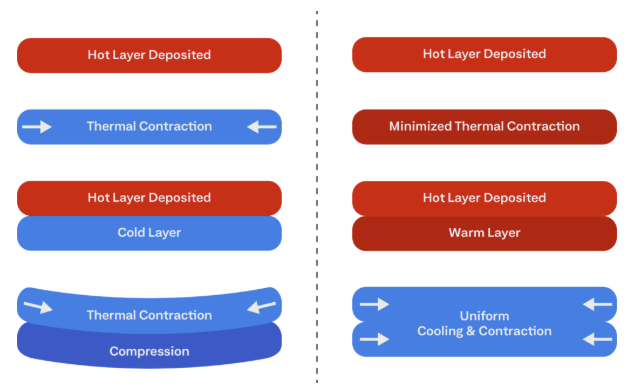
Warping and distortion during printing is caused by thermal contraction and crystallization shrinkage, both of which occur during cooling. Uneven thermal contraction occurs in even consumer-grade filaments such as ABS, but it is even more pronounced in high temperature materials.
A well-controlled and actively heated enclosed 3D printer chamber can reduce both of these effects.
Interlayer Bond Strength / Z-axis Strength
The interlayer bond strength in extruded filament parts is directly affected by two things, which are the neck width between the upper/lower filament tracks, and the level of polymer linking between layers. These are directly affected by the heat, and if the randomization of polymer chains between layers is insufficient due to the temperature being too low, this can result in poor interlayer bond strength, poor layer adhesion, and even layer separation – all contributing to lower quality and z-axis strength, a common issue in 3D printing.
Moisture
PEEK is only mildly hygroscopic compared to many 3D printing materials.
In terms of moisture absorption, PEEK takes up around 0.1% of its total mass in moisture over 24 hours, and saturates at around 0.5% of its total mass. Compare that to PA6, which can absorb 1.5% moisture over 24 hours, and saturates at around 9%. In comparison, PA6 is extremely hygroscopic with respect to PEEK.
If there is moisture present in the PEEK, it should become apparent from the production of steam and the formation of small bubbles and some spitting during extrusion. These bubbles can embed in the deposited filament tracks and potentially cause degraded interlayer bonding.
If this occurs, the filament can be dried in a thermal vacuum chamber or dedicated drying box at 120–150°C for 3-6 hours before printing. It is worth noting that repeated drying cycles can degrade filament, making it brittle to print, and reducing the mechanical properties of the printed part.
So bear in mind the golden rule: it is better to keep filament dry in the first place, than it is to attempt to dry it out after the fact. To keep it dry, a dedicated dry cabinet or use of silica gel should be employed, especially if printing in a humid environment.
Key Material Properties Relevant to Printing
A full breakdown of PEEK’s mechanical, thermal and chemical properties belongs in a dedicated materials article, and that is where the complete data tables live. For printing, a handful of properties fixing the thermal window is what matters most.
PEEK has two thermal transitions that bracket that window. Its glass transition temperature (Tg) is 143°C and its melting temperature is 343°C. Crystallization happens in the range between them, and the working floor for it is the 133°C chamber and bed figure. The whole task of a PEEK printer is to hold the part inside that band long enough to crystallize, then cool it in a controlled way. Nothing else about the material is as demanding to satisfy.
Crystallization also carries a volume change. As amorphous PEEK orders into its crystalline phase it contracts, and that contraction stacks on top of ordinary thermal shrinkage. This is why warping and residual stress hit harder in PEEK than in an amorphous polymer, and why annealing a finished part distorts it rather than simply strengthening it.
Moisture is the milder constraint. PEEK absorbs only about 0.1% of its mass over 24 hours and saturates near 0.5%, far less than nylon, but PEEK’s extrusion temperatures are high enough that even that much water flashes to steam in the nozzle. Low absorption still means dry storage, and drying when a spool has been left out.
All other properties are relevant for engineering purposes when trying to determine if PEEK is the right material to fulfil the requirements.
PEEK Applications
PEEK gets specified when a part has to survive heat, aggressive chemicals, high pressure or the inside of a human body, and a cheaper polymer cannot. That requirement concentrates its use in four main sectors.
| Sector | Why PEEK | Typical printed parts |
|---|---|---|
| Aerospace and aviation | High specific strength, plus strong FST (Flame, Smoke, Toxicity) performance in uncoated form | Seat components, panels and fittings, latches, electrical connectors, housings |
| Space | Low outgassing, thermal stability, radiation resistance | CubeSat structures, brackets and fixtures, vacuum-compatible mechanisms, bearings and bushings, thermal isolators |
| Subsea and oil and gas | Resistance to water absorption and hydrolysis under pressure | Seals and backup rings, connector housings, pump components, small remotely operated vehicle (ROV) parts |
| Medical | Radiolucent, biocompatible, stiffness close to human bone | Spinal, orthopedic and maxillofacial implants, surgical instrument handles, sterilizable tools |
The common thread is that PEEK is rarely the convenient or cheap option. It is the one chosen when the operating environment would defeat a commodity or standard engineering plastic and the part still has to perform.
A Great Material that Needs the Right Printer
PEEK is not difficult to print because the plastic is temperamental. It is difficult because the same filament can produce a strong semi-crystalline part or a weak amorphous one, and which one you get is decided by whether the chamber holds 133°C or higher for the whole print. Get the nozzle, chamber and bed temperatures right, keep the filament dry, and the material’s performance follows. Run the chamber cold and no amount of post-processing fully recovers what was lost.
To get the properties right as promised by any manufacturer’s data sheet, you need a proper printer engineered to maintain and withstand the high heat required for quality PEEK prints.
Achieve New Levels of Part Performance & Throughput
3D print the world's highest performance polymers - bigger, faster, and stronger than ever.